“You've just purchased a new 10G SFP+ transceiver for your network switch. But before you can get the optic transceiver running, you need to connect it with a fiber patch cable. This is where a critical decision comes in: Single Mode or Multimode? Choosing wrong can lead to no connection, poor performance, or even damage. This guide will clear all the confusion.”
In the world of optical networking, Optical transceivers and fiber patch cables work hand-in-hand. While you've chosen the right SFP transceiver, selecting the wrong patch cable can lead to complete link failure. The fundamental choice is between Single Mode and Multimode fiber.
一、What is Single-Mode Fiber (SMF)?
· 1.Core Trait: It allows only one mode of light to travel through.
· 2. Physical Structure: It has a very thin core, typically 9 micrometers (µm) in diameter. Imagine a straight, single-lane highway for light.
· 3.How it Works: Because the path is so narrow, light travels in a straight line directly down the center with little to no reflection. It uses a highly focused Laser light source.
· 4.Best For:
(1)Long-distance communication (from kilometers to over 100 km).
· (2)High-bandwidth applications.
· (3)Backbone networks, telecom, and MAN/WAN networks
二、What is Multimode Fiber (MMF)?
1.Core Trait: It allows multiple modes (or paths) of light to travel simultaneously.
· 2.Physical Structure: It has a much thicker core, typically 50µm or 62.5µm in diameter. Imagine a wide, multi-lane city street.
· 3. How it Works: The wide core allows light waves to bounce and take multiple paths. It uses cheaper light sources like LEDs or VCSELs (Vertical-Cavity Surface-Emitting Lasers).
· 4. Best For:
· (1)Short-distance communication (typically up to 550 meters for 10G on OM4).
· (2)Cost-sensitive applications where distance is not a factor.
· (3) Data centers, local area networks (LANs), and campus networks.
三、How to Tell Them Apart: A Practical Guide
Distinguishing between single-mode and multimode patch cables is straightforward. Here are the most common methods:
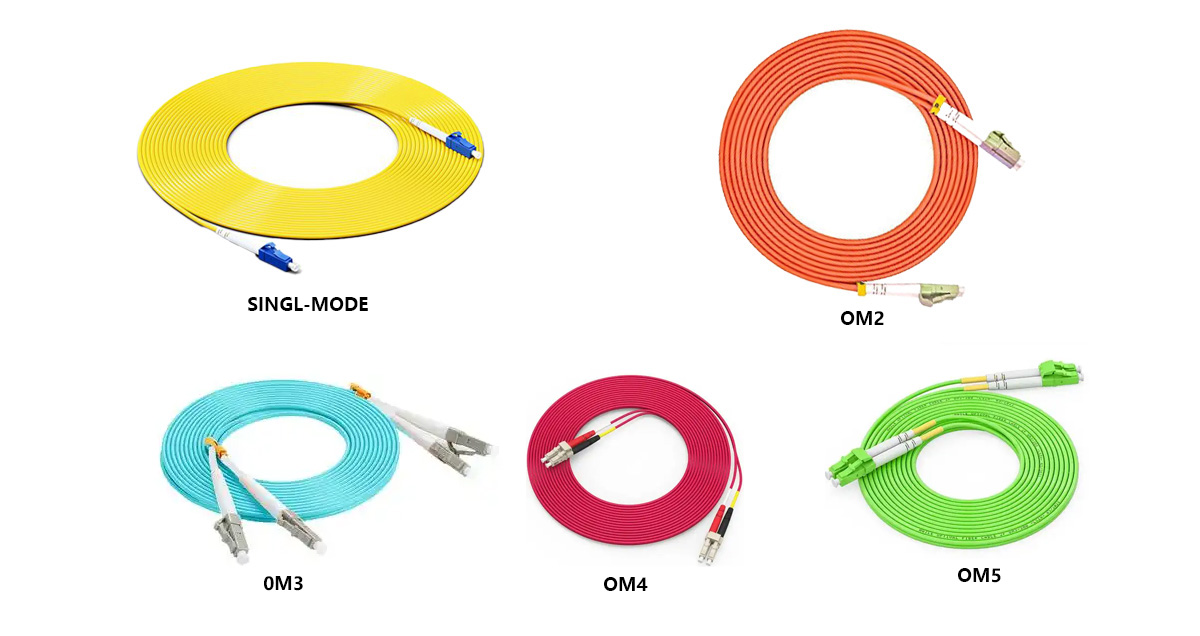
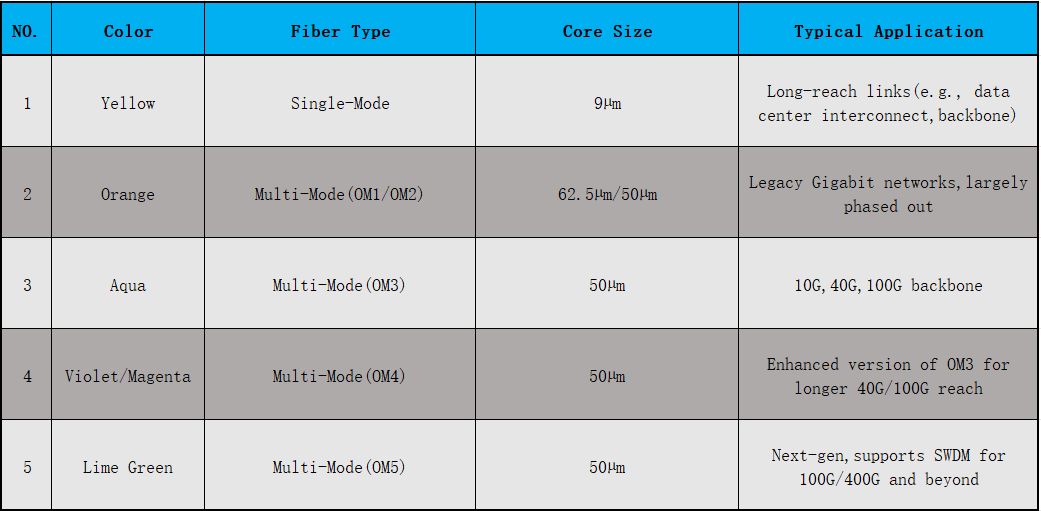
1. Look at the Color (The Easiest Method)
This is the universal industry standard.
(1) Single-Mode Patch Cable: Typically has a Yellow jacket.
· (2)Multimode Patch Cable:
· OM1/OM2: Typically has an Orange jacket.
· OM3/OM4/OM5: Typically has an Aqua /Violet/Magenta/Lime Green jacket.
2. Read the Printing on the Jacket
The cable jacket is printed with text that clearly states its type.
Single-Mode: Look for "SM," "Single Mode," or "G.652D."
· Multimode: Look for "MM," "Multi Mode," "OM3," or "OM4."
3. Check the Connector Color
The color of the connectors (like LC, SC) is also a key indicator.
Single-Mode: Typically uses Blue connectors.
· Multimode: Typically uses Beige or Black connectors.
· Note: High-performance OM3/OM4 cables sometimes use aqua connectors, so always double-check the
cable jacket color.
4. Consider the Application and Transceiver
If the link is longer than 1 km, it's almost certainly using Single-Mode.
· Check your transceiver model:
· "LX," "EX," "ZX," "ER," "LR" codes usually indicate a Single-Mode transceiver.
· "SX," "SR," "MM" codes usually indicate a Multimode transceiver.
Distinguishing Patch Cable Colors
 How to Choose OM3/OM4/OM5?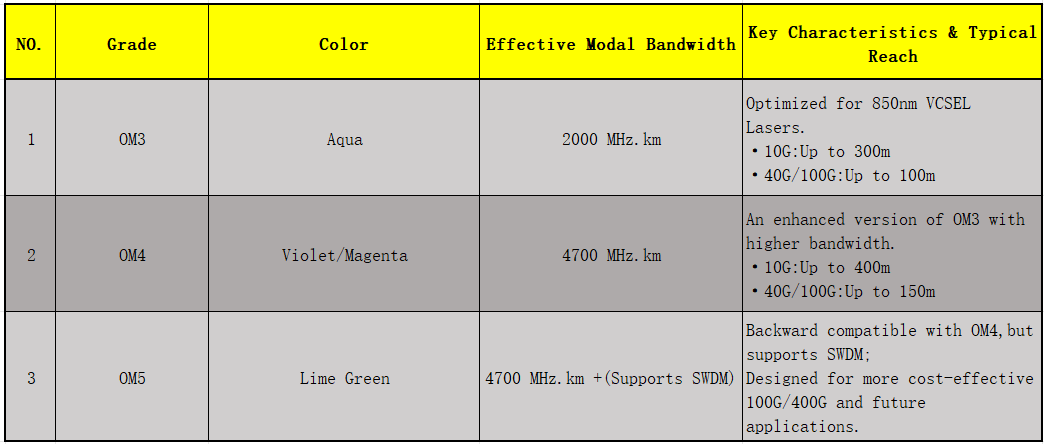
四、The Golden Rule: Never Mix and Match!
Using a single-mode SFP transceiver with a multimode patch cable (or vice-versa) will result in a complete link failure or severely degraded performance. Always ensure your fiber optic transceiver type is perfectly matched with your fiber patch cable type.
Looking for compatible, high-quality fiber patch cables for your SFP Modulet? Browse our selection to find the perfect match for your network setup, ensuring optimal performance and reliability.

